
This guide is designed for Principal Investigators (typically members of staff) who wish to have oversight of a study being conducted under their supervision.
Quick links
- SONA guidance homepage: https://cocolab.org/sona/home.html
- SONA participant guidance site: https://cocolab.org/sona/participant.html
- SONA researcher guidance site: https://cocolab.org/sona/researcher.html
- SONA principal investigator guidance site: https://cocolab.org/sona/principal_investigator.html
Introduction
SONA is the School of Psychology's research participation system. The SONA system allows students and staff to (i) participate in advertised (paid and point-based) studies and (ii) advertise their studies and recruit SONA users as participants. Staff can also act as Principal Investigators to gain oversight of studies that are being conducted under their supervision / management.
You can access the SONA system here: https://northumbriapsychology.sona-systems.com.
This page provides guidance for Principal Investigators who will typically be members of staff in the School of Psychology. As a Principal Investigator, you will have oversight of studies being conducted by Researchers working under your supervision (e.g., Level 6 & 7 thesis project students) or management (e.g., Research Interns & Volunteer Research Assistants), as long as they add you as the Principal Investigator to the SONA advert.
Requesting a Principal Investigator profile
To gain oversight of studies that are being conducted under your supervision / management, you must obtain a Principal Investigator profile. This must be added to your account manually by the SONA administrator.
To request a Principal Investigator profile, please email the SONA administrator (hl.sona@northumbria.ac.uk) and provide your staff email and username.
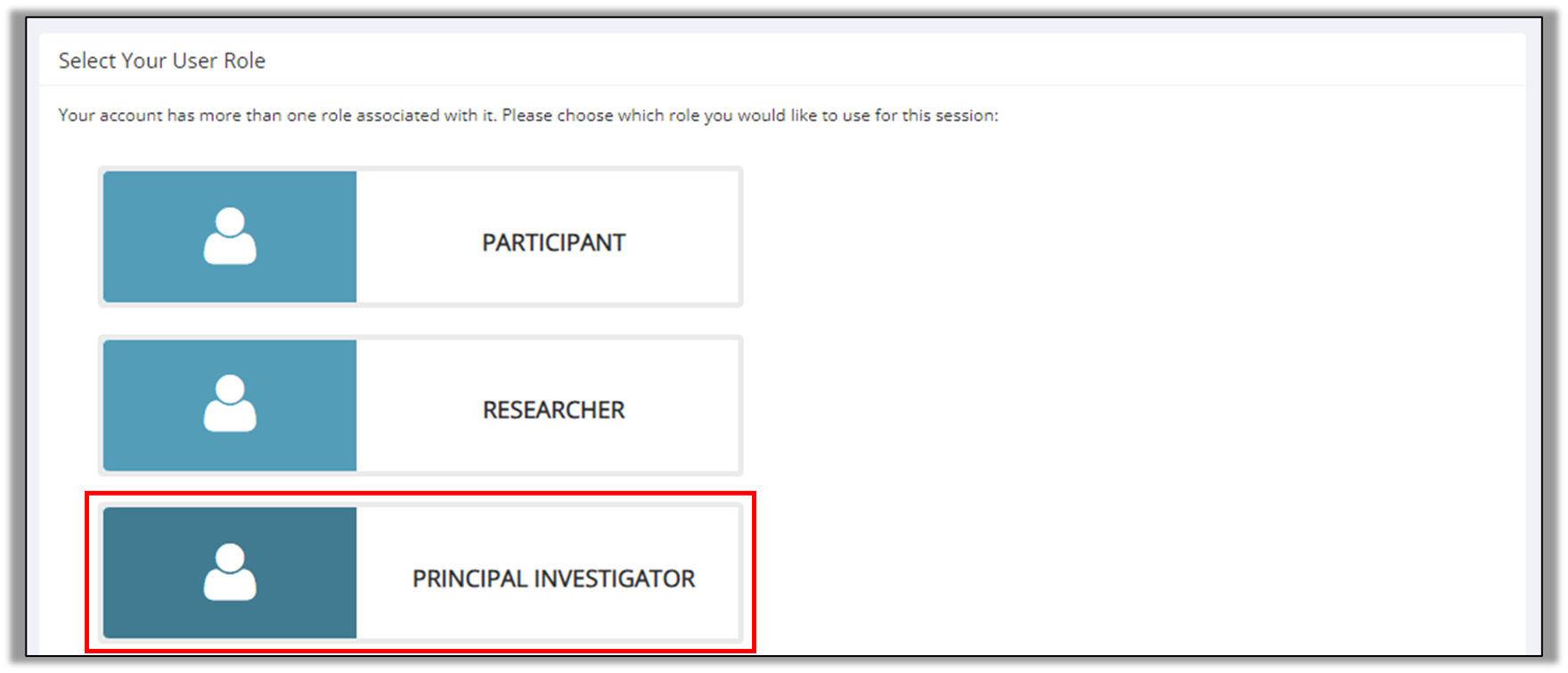
Once a Principal Investigator profile has been added to your account, you will be able to select the Principal Investigator profile when you next log into the SONA system - see photo below:
How does a researcher add me as Principal Investigator to their SONA study?
When creating a study advert, a researcher is required to select the Principal Investigator from a list. Only people with a Principal Investigator profile appear in this list. All students / researchers who advertise their study on the SONA system are required to select the Principal Investigator before their study is approved.
Please direct your student / researcher to the Guidance for Researchers page to learn how to add you as the Principal Investigator to their SONA study advert: https://cocolab.org/sona/researcher.html
Viewing your research team's studies
If a researcher has added you to a study as the Principal Investigator, it will appear in My Studies.
As a Principal Investigator, you can manage a study in the same way as a Researcher. Please visit the Guidance for Researchers page to learn how to advertise a study to SONA users: https://cocolab.org/sona/researcher.html
Amending your research team's studies
If a researcher has added you to a study as the Principal Investigator, it will appear in My Studies.
As a Principal Investigator, you can amend a study in the same way as a Researcher. Please visit the Guidance for Researchers page to learn how to amend a study advert: https://cocolab.org/sona/researcher.html
Adding your study to SONA
Your Principal Investigator profile allows you to create a study advert in the same way that is possible using a Researcher profile. Please visit the Guidance for Researchers page to learn how to advertise a study to SONA users: https://cocolab.org/sona/researcher.html
When you have created a study advert, you can add researchers to the study. To do this, each researcher must have a SONA account and a Researcher profile. Please direct your student / researcher to the Guidance for Researchers page to learn how to acquire a Researcher Profile: https://cocolab.org/sona/researcher.html
FAQs for Principal Investigators
Why would I want to view my team's SONA studies?
Issues with SONA, for example, a study not appearing to participants, are often due to basic errors that can be fixed easily. Oversight of SONA studies through your Principal Investigator account allows you to assist your students / research team and fix such issues and check participation rates. Furthermore, as a team leader, it provides you with control over studies where there may be multiple researchers contributing to aspects of the project.
Can I advertise a study as a Principal Investigator?
Yes. Your Principal Investigator profile allows you to create a study advert in the same way that is possible using a Researcher profile. Please visit the Guidance for Researchers page to learn how to advertise a study to SONA users: https://cocolab.org/sona/researcher.html
Can I add multiple researchers to a SONA study?
Yes. You can add multiple researchers to a study. To do this, each researcher must have a SONA account and a Researcher profile. Please direct your student / researcher to the Guidance for Researchers page to learn how to acquire a Researcher Profile: https://cocolab.org/sona/researcher.html
I cannot see my student's / researcher's SONA study
This is most likely because they have not added you as the Principal Investigator when creating the study advert. Please direct your student / researcher to the Guidance for Researchers page to learn how to add you to the study as the Principal Investigator: https://cocolab.org/sona/researcher.html
My student's / researcher's study has been approved, but participants cannot see it / nobody is taking part.
This is most likely because (i) they have not set the study to be active or (ii) no timeslots have been added to the study. To change the study to active, go to Study Menu > Change Study Information. To add timeslots, go to Study Menu > View/Administer Time Slots > Add Time Slots. For further information, visit the Guidance for Researchers page: https://cocolab.org/sona/researcher.html
I am unable to log into my account, or I receive an error message. What should I do?
Please email the SONA administrator at hl.sona@northumbria.ac.uk. The SONA administrator will respond within three working days, but complex queries may require more time to resolve.
Can I approve a study as supervisor?
No. While possible in the system, this feature is switched off so that all study approval requests go to the SONA administrator so that all researchers receive the same treatment. Studies are typically approved on the day of submission unless the SONA administrator identifies issues in the listing.
I need further help
Please email the SONA administrator if you have questions about the SONA system that are not answered here: hl.sona@northumbria.ac.uk. The SONA administrator will respond within three working days, but complex queries may require more time to resolve.