
This guide is designed for SONA users who wish to use the system as a researcher, especially: - Level 6 PY0663 Psychology Project students - Level 7 MSc & MRes thesis project students - PhD students - Other staff and student researchers, including Research Assistants, Research Interns, Placement students, and Volunteer Research Assistants
Quick links
- SONA guidance homepage: https://cocolab.org/sona/home.html
- SONA participant guidance site: https://cocolab.org/sona/participant.html
- SONA researcher guidance site: https://cocolab.org/sona/researcher.html
- SONA principal investigator guidance site: https://cocolab.org/sona/principal_investigator.html
Introduction
SONA is the School of Psychology's research participation system. The SONA system allows students and staff to (i) participate in advertised (paid and point-based) studies and (ii) advertise their studies and recruit SONA users as participants. Staff can also act as Principal Investigators to gain oversight of studies that are being conducted under their supervision / management.
You can access the SONA system here: https://northumbriapsychology.sona-systems.com.
All students, PGRs, and staff can use SONA to advertise a study and recruit SONA users as participants. There is no specific threshold of SONA points that an individual must meet in order to use the SONA system as a researcher and recruit participants. However, if you do not contribute to our research culture via participating in other people's research, you should not expect to use the system as a researcher and benefit from this culture to recruit participants.
Requesting a Researcher profile
If you are a student, when you signed up for a SONA account using your Northumbria University email address and password, you will have acquired a Participant profile automatically. This Participant profile allows you to participate in studies only.
To advertise a study on SONA and recruit SONA users as participants, a Researcher profile must be added to your profile manually. To request a Researcher profile, please email the SONA administrator (hl.sona@northumbria.ac.uk) from your Northumbria University email address.
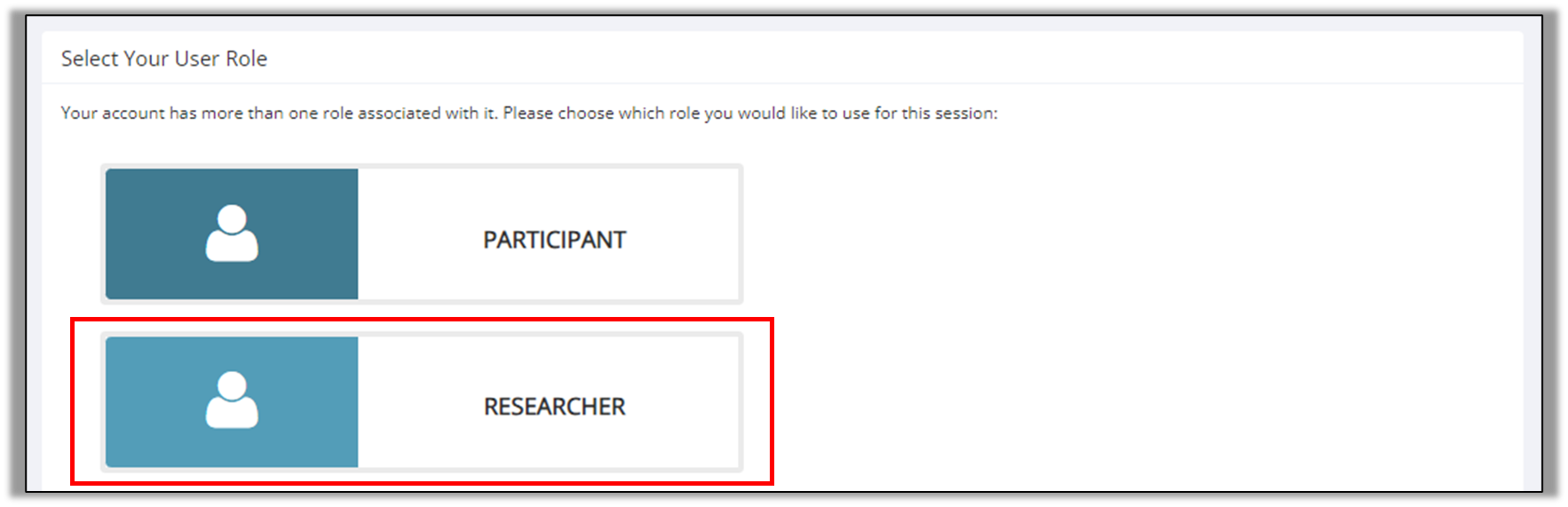
When you have a Researcher profile, you will be able to select the Researcher profile when you next log into the SONA system - see photo below:
Why should I use SONA?
The SONA system allow students and staff to recruit people from an active pool of research participants. If you have contributed to our School's research culture via participating in SONA studies, it is fair that you have access to the system as a researcher when conducing your own research. SONA can integrate with external software (e.g., Qualtrics, Pavlovia, PsyToolkit) so you can award points for participation even if you are running an online study. More details are given in the FAQs at the end of this document.
How many points can I offer?
Online studies, including survey-based research on Pavlovia or Qualtrics: you must award 1 point per 15 minutes of expected participation time (e.g., 0-15 mins = 1 point, 16-30 mins = 2 points etc).
In-person studies, including on campus laboratory-based research and interviews conducted over MS Teams: you must award 2 points per 15 minutes of expected participation time (e.g., 0-15 mins = 2 points, 16-30 mins = 4 points etc). This higher rate reflects the increased commitment that participants make for in-person research.
In some circumstances, if a study is especially demanding, a higher rate of SONA points may be offered. Please contact the SONA administrator (hl.sona@northumbria.ac.uk) if you feel a higher rate of points is appropriate for your study.
Studies that have the incorrect points value will not be approved.
Before advertising a study on SONA
Acquiring a Researcher profile
If you are a student, you must have a Researcher profile attached to your SONA account before you can advertise a study through SONA - see earlier section for details about how to acquire a Researcher profile. If you a member of staff, you can advertise a study through a Principal Investigator profile, but you must follow the same steps as outlined on this page.
Please be aware that all studies must be manually approved by the SONA administrator before they are made available on SONA. It can take up to five working days before they will be shown on SONA. Please take this into account should you have a short deadline for data collection.
Ethical approval
You MUST have ethical approval for your research before a study can be advertised through the SONA system. You must also have specifically stated in your ethics form that you wish to use the SONA system to recruit participants. If you have not done this, then you will need to submit an ethics amendment.
Example text to include in your ethics application: "The School of Psychology's Research Participation System (SONA) will be used to recruit participants for the current study. The SONA system allows users to participant in psychological research studies and recruit SONA users as participants. The pool of SONA users comprises students and members of staff in Northumbria University's School of Psychology".
Adding your study to SONA
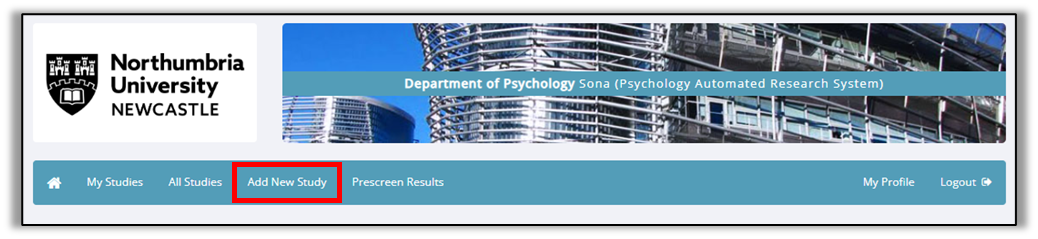
Visit the SONA site (https://northumbriapsychology.sona-systems.com) and log in using your Northumbria University email address and password. Select your Researcher profile and click Add New Study.
Select the study type
For an in-person study (e.g., for an interview or an in-person testing session) that has fixed time slots for people to participate, you will need to select ‘standard study’.
If your study takes place over multiple sessions (e.g., a study with follow-up time points) then choose “Multi-Part Standard Study”)
For an online study (e.g., Qualtrics survey or Pavlovia experiment) where people can complete the study at a time that suits them, select the ‘Online External Survey’ option. Do not click the ‘Online Survey Study’ option.
If you will award SONA points as reimbursement, select the Credits box. If you will award financial reimbursement, select the Paid box.
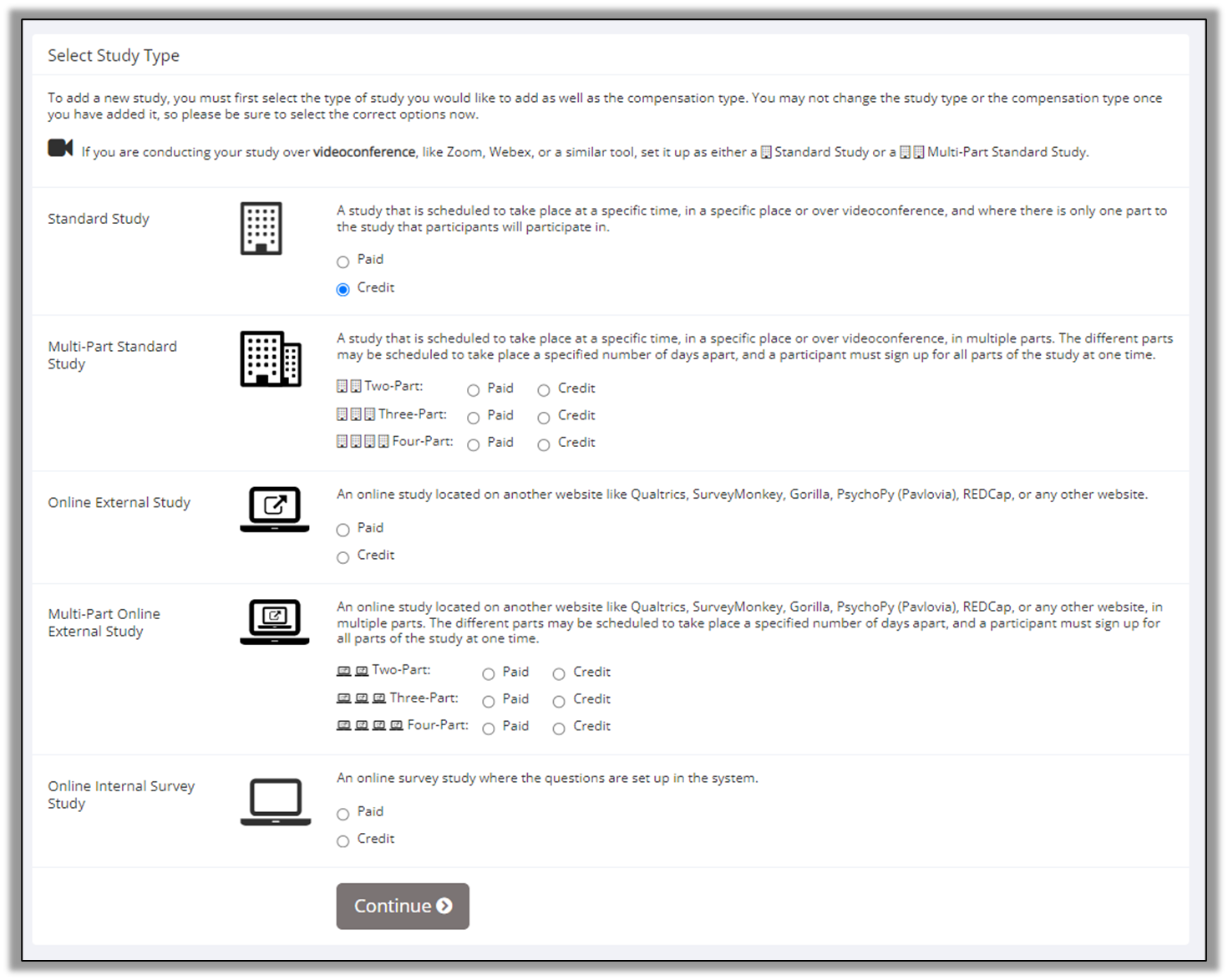
If you are using a complex study design, please see the information provided by the SONA system developers: https://www.sona-systems.com/researcher-documentation/.
Basic Study Information
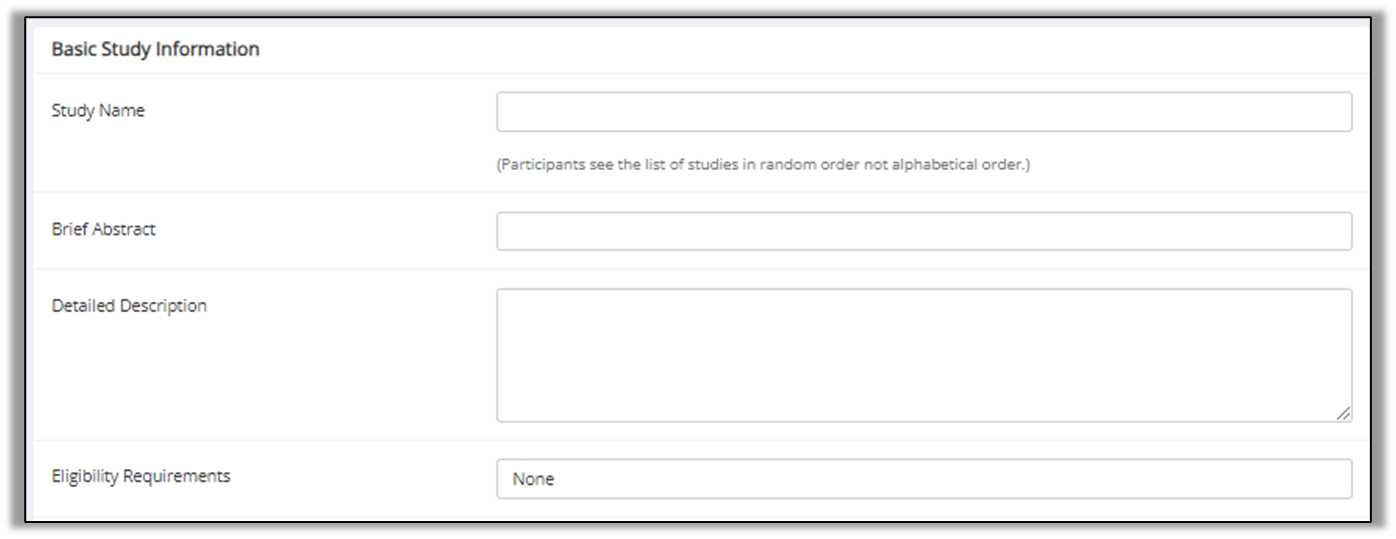
You will then be taken to the ‘Study Information’ screen. In ‘Basic Study Information’, this is what a potential participant will see, so ensure that enough detail is provided for SONA users to make an informed decision about signing up for the study.
It is mandatory that you complete the Study Name, Brief Abstract, and Detailed Description sections. Such information can be adapted from your Participant Information Sheet, but you only need to include key information here to ensure the participant is clear about what the study involves.
In the Eligibility Requirements section, ensure that any inclusion and exclusion criteria are stated, for example, restrictions around age.
Studies offering SONA points as reimbursement* If your study is offering SONA points as reimbursement, enter the total duration (in minutes) in the Duration box and number of SONA points being offered in the Points box.
Unless agreed otherwise with the SONA administrator, for online studies, you must award 1 point per 15 minutes of expected participation time (e.g., 0-15 mins = 1 point, 16-30 mins = 2 points). For in-person studies, you must award 2 points per 15 minutes of expected participation time (e.g., 0-15 mins = 2 points, 16-30 mins = 4 points).

Studies offering financial rewards as reimbursement If your study is offering financial rewards as reimbursement, enter the total duration (in minutes) in the Duration box and value and type of the financial reward in the Payment box.
It is generally expected that you will award financial rewards that are in keeping with UK national minimum wage on a pro rata basis, and that the total value of the reward will depend on the study duration and complexity. The type of financial reward can differ between studies depending on funding arrangements, for example, some studies may offer payment via bank transfer, while others may provide financial rewards through electronic shopping vouchers. The value and type of financial reward, and source of funding, must always be specified clearly in the Basic Study Information section.

Important: It is the Researcher's responsibility to arrange payment with the participant and acquire sufficient information from them (e.g., bank details, email address) to facilitate the awarding of financial reimbursement. SONA is not like online research participation systems like Prolific, where cash is loaded to the online platform to pay participants. You, the Researcher, must make arrangements to pay people who sign up for your studies via the SONA system. Please ensure you have made such arrangements, especially for online studies, prior to advertising the study on SONA.
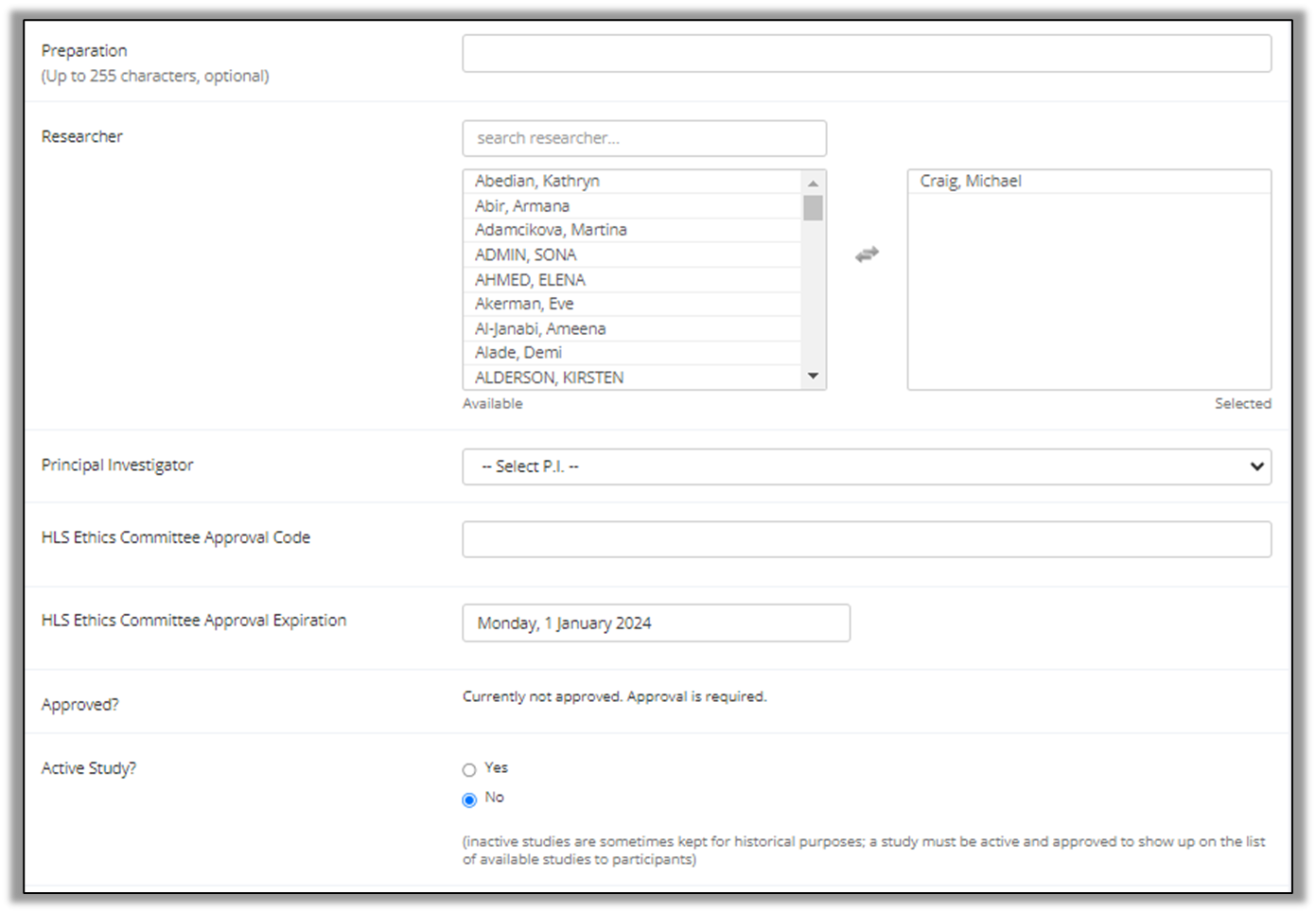
Adding other Researchers and a Principal Investigator In the Preparation box, list any requirements for the participant that they must engage with prior to participating in the study. In most cases, this should be 'None'.
In the Researcher box, you can select any other researchers who are working on the study with you (e.g., as part of a research lab or group project activities). This feature is especially useful should you be conducting a lab-based study, where different researchers are available to conduct the study at different times. You do not need to add other researchers unless you are collaborating with a specific individual who you want to name.
In the Principal Investigator box, select your research supervisor / line manager. For thesis project students, this will be your research supervisor. For Volunteer Research Assistants, Research Interns, or Research Assistants, this will be your line manager / supervisor. If your supervisor is not on the list, please email the SONA administrator at hl.sona@northumbria.ac.uk.
In the HLS Ethics Committee Approval Code and HLS Committee Approval Expiration boxes, you must enter your corresponding ethics ID submission code (e.g., 5949) and ethics expiry date. Your study will not be approved unless you include this information. Ethical approval from the Faculty of Health and Life Sciences must be in place for a study to be advertised on SONA.
For the Approved Study? section, select 'Yes' to indicate that your study should be active on the system. Please note it will not be visible to participants until it has been manually approved by the SONA administrator.
If your study is an online study, you must enter the URL to your study in the Study URL box in Advanced Settings section towards the bottom of the page.
 Next, it is recommended that you go to Automatic Credit Granting in Advanced Settings and choose ‘No’. An explanation of why this is necessary is included within the FAQs section. Further advanced settings will allow you to, for example, embed an automatic survey ID that will allow you to identify which participants completed the study, or allow you to find a link to your study. If you switch automatic credit granting off, please ensure you log in to SONA regularly and award credits to people participating in your research. It is expected that credits are awarded (or rejected) within 5 working days from the date of participation.
Click Add This Study.
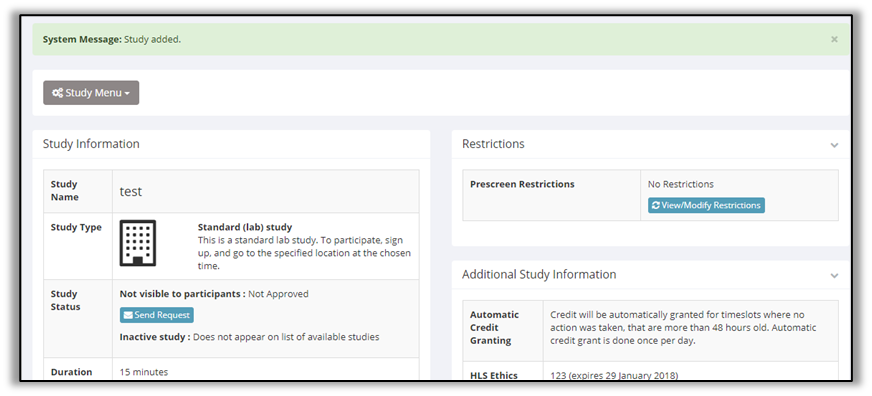
Request study approval After adding your study, you must manually request that the SONA administrator review and approve your study. To request approval, click the ‘Send Request’ button shown in the photo below. When sending the request, there will be opportunity to add optional comments to help the SONA administrator review your study.
Please allow up to five working days for approval. If, after five working days you have not received approval, send the SONA administrator an email at hl.sona@northumbria.ac.uk.
Amending a study
If you need to amend the details of a study, go to My Studies and click on the study that you wish to amend. Next, click Study Menu and then Change Study Information. You will then be able to amend the Basic Study Information and other study settings. Depending on the changes that you make, you may be required to re-submit the study for approval by the SONA administrator.
After you have received approval
Once your study has been approved, it will appear in My Studies.
Next, for your study to be visible to participants, you must add timeslots. It is important that this is done (even for online studies) as without timeslots, participants will not be able to find your study.
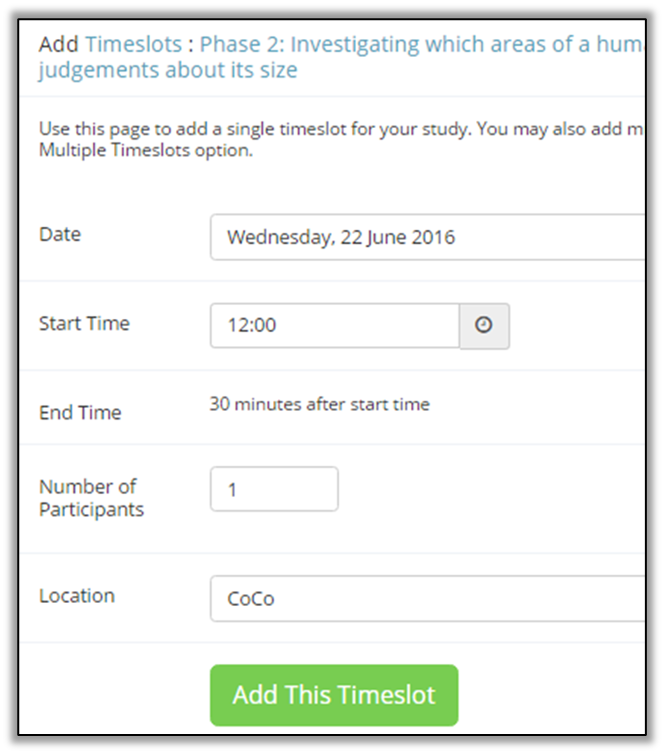
To add timeslots, go to My Studies and click on the study that you wish to add timeslots to. Next, click Study Menu and then View/Administer Time Slots. On this page, you can manage existing time slots and add new ones.
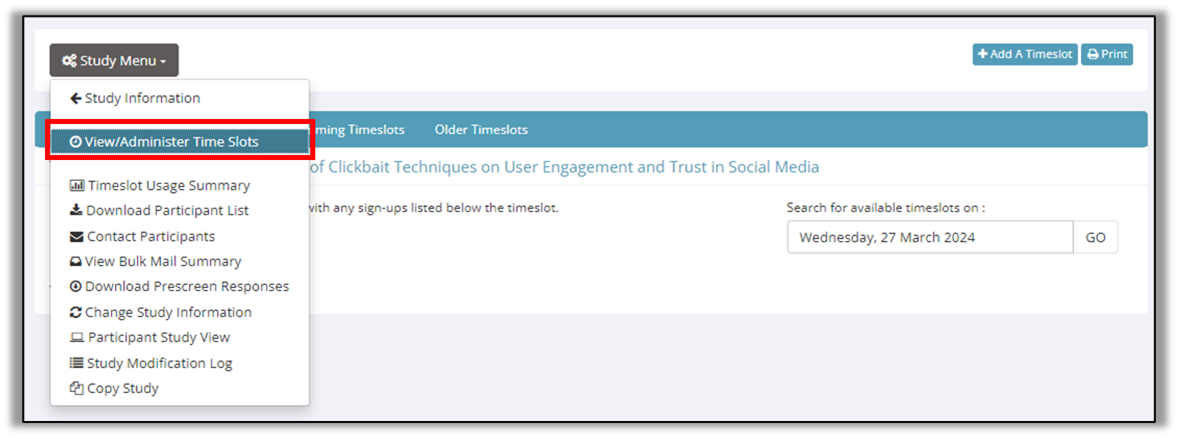 T add timeslots, click ![[img/Add a Timeslot.png]] at the top right of the page()
Online studies
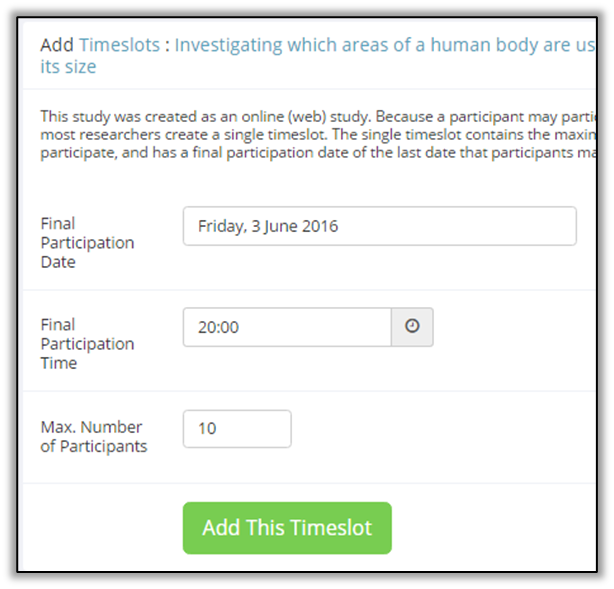
For online studies, when adding timeslots you will be able to choose the final participation date, time and the maximum number of participants required. These details should mirror the details that you included in your ethics application.
The final participation date should reflect the date that you will end data collection. If you are a Level 6 dissertation project student or Level 7 thesis project student, it is recommended that you enter your dissertation/thesis submission date into this box.
In-person studies
For in-person studies, including laboratory studies and interviews conducted over MS Teams, you should choose the date, time, and location of your study. You can add multiple timeslots across different days and times. If multiple researchers are working on the study, you can specify which researchers will be available to deliver specific timeslots.
Awarding SONA points to participants and flagging no shows
To change a user's participation status, go to My Studies and click on the study that you wish to award points for participations. Next, click Study Menu and then View/Administer Time Slots. On this page, you can view all participants who have signed up or completed your study. To amend a user's status (e.g., to award SONA points or mark someone as a no show), click Modify.
When you have selected the appropriate option for one or more participants (see below), click Update Sign-Ups to confirm the award of SONA points (or not) and notify the participant of this outcome.
Awarding full or partial SONA points
If the participant met the conditions of the study and completed it in full, select Grant Credit and enter the number of points that should be awarded for the full completion of the study. If the participant has partially met the requirements of the study, you can award a fair proportion of the total SONA points being offered by selecting Grant Credit and entering a specific number of points into the box.
Awarding full or partial financial rewards
If the participant met the conditions of the study and completed it in full, select Grant Credit and enter the value of the reward that should be awarded for the full completion of the study. If the participant has partially met the requirements of the study, you can award a fair proportion of the total financial reward being offered by selecting Grant Credit and entering a specific value of the reward (in £s) into the box.
Please note, it is the Researcher's responsibility to arrange payment with the participant outside of the SONA system and acquire sufficient information from them (e.g., bank details, contact address) during the study to facilitate the awarding of financial reimbursement. This arrangement must be outlined in the approved ethics application associated with the study.
SONA is not like online research participation systems like Prolific, where financial rewards are loaded to the online platform to pay participants. You, the Researcher, must make arrangements to pay people who sign up for your studies via the SONA system. It is your responsibility to organise such payments within a reasonable time scale, for example, five working days.
Marking a participant as a no-show
If the participant did not attend your study and you wish to mark them as a no show, click Modify on the View/Administer Time Slots page. Now, you can mark them as an authorised or unauthorised no-show.
If the participant has contacted you with a genuine reason for their no-show, please mark them as an Excused no-show. If you have had no contact from the participant or their reason for missing the session is not sufficient, please mark them as an Unexcused no-show. If needed, you can add comments to explain your decision to award or not award SONA points.
FAQs for Researchers
Do I need ethical approval to advertise a study on SONA?
Yes. Your study will not be approved to be advertised on SONA without evidence of ethical approval.
Also, you must specify in your ethics application that SONA will be used to recruit participants. For example, "The School of Psychology's Research Participation System (SONA) will be used to recruit participants. The SONA system allows users to participant in psychological research studies and recruit SONA users as participants. The pool of SONA users comprises students and members of staff in Northumbria University's School of Psychology".
Do I need to acquire a specific number of SONA points to use SONA as a researcher?
No. There is no minimum points requirement to acquire a Researcher profile and recruit SONA users as participants. For example, you may be a Level 4 student who needs to use the SONA system to recruit participants for a Voluntary Research Assistant role.
However, please be aware that as part of your studies you may be required to collect SONA points by participating in research. Please see the Guidance for Student Participants page for further information: https://cocolab.org/sona/participant.html
I am unable to log into my account, or I receive an error message. What should I do?
Please email the SONA administrator at hl.sona@northumbria.ac.uk. The SONA administrator will respond within three working days, but complex queries may require more time to resolve.
I am unable to select my supervisor as a principal investigator. What should I do?
Please email the SONA administrator at hl.sona@northumbria.ac.uk. The SONA administrator will respond within three working days, but complex queries may require more time to resolve.
SONA can be linked to external survey/research tools. How do I do this / why is this not covered on this site?
The current version of SONA can integrate with a wide range of external tools, including Qualtrics, PsyToolkit, jsPsych, Gorilla, PsychoPy (Pavlovia), Testable, and many others.
The reason that this is not covered on this SONA guidance page is because each tool is frequently updated, and the technical requirements tend to change over time. SONA maintains a web page which provides specific instructions for each tool, and this is available here: https://www.sona-systems.com/help/ . Follow the guidance for your chosen research tool. Your research supervisor may also be able to assist.
My study has been approved, but participants cannot see it / nobody is taking part.
This is most likely because (i) you have not set the study to be active or (ii) no timeslots have been added to your study. To change the study to active, go to Study Menu > Change Study Information. To add timeslots, go to Study Menu > View/Administer Time Slots > Add Time Slots.
Time slots must be added for both online and in-person studies for them to be visible to participants. For in-person studies, you must specify the dates and times that you are available to conduct the study. For online studies, you should add the total number of participants that you require by the end date of your data collection period.
Is point granting automatic?
In some cases, yes, but please always manually award points ASAP after a participation. This is to avoid situations where participants, who have not completed a study, still receive points. This typically happens in online studies. If you are running an online study, then you should include a step which will allow you to identify each participant, so that they can be compared to your SONA sign-ups. See the “After you have received approval” section for details regarding this. Alternatively, you could ask your participants to email you a code, embedded within your survey, which you could use to verify that they have completed the study.
What if someone signed up for a study but did not turn up?
If a participant did not attend a scheduled session for an unexplained reason, you can fine the participant the same number of SONA points that they would have received had they completed the study. Before such action, please provide the participant with opportunity to reschedule. You should mark them as an no-show excused / unexcused once they have responded to you. If they repeatedly do this, their access to SONA will be withdrawn.
I recruited someone outside of SONA - can I give them SONA points?
No. Only participants recruited through SONA can have points awarded to their account.
What if a participant attends an in-person study, but did not complete the full study?
You should award points for partial attendance (at a minimum of 2 points for 15 minutes of time).
Can points be transferred from one user to another?
No. This is not permitted.
Is there a guarantee that I will get all participants that I need from SONA?
No. SONA should be one of several recruitment tools that you use to facilitate recruitment for your research. This will help with data quality and your ability to generalise findings. In some circumstances, SONA may not be an appropriate recruitment tool to use at all, for example, if you are recruiting older adults given that SONA users are predominantly undergraduate students aged 18-25 years old.
Am I responsible for awarding SONA points?
Yes, unless your study is set up to automatically award SONA points. If your study will not award points automatically, it is essential that you manually check the data quality and completeness and then award SONA points to your participants within a reasonable time frame, e.g., 5 working days. Some courses require students to collect SONA points by specific deadlines. It is expected that you will award points (or reject a participation) within five working days. If you continually breach this and fail to award points in a timely manner, your Researcher account will be withdrawn and you will not be able to recruit using SONA.
Can I offer financial reimbursement through SONA and how much should I offer?
Yes. Financial rewards can only be offered where research funding supports the work, i.e., in no circumstances can personal finances be used to reimburse participants. If a financial reward is being offered, evidence of research funding will be required before your study can be advertised.
It is generally expected that the level of financial reward being offered is in keeping with UK national minimum wage on a pro rata basis, but the total value of the reward will depend on the study duration and complexity. The type of financial reward can differ between studies depending on funding arrangements, for example, some studies may offer payment via bank transfer, while others may provide financial rewards through electronic shopping vouchers. The value and type of financial reward, and source of funding, must always be specified clearly in the Basic Study Information section.
Can I pay participants with my own money?
No. This is not permitted under any circumstances. Funding for financial reimbursement must come from formal research funding, for example, through an external research grant.
How do I book a lab for my research?
If you require a specialist lab for your research, for example, an EEG or eye tracking lab, please speak to your research supervisor / line manager who can advise you how to book lab spaces within the School of Psychology.
I need further help
Please email the SONA administrator if you have questions about the SONA system that are not answered here: hl.sona@northumbria.ac.uk. The SONA administrator will respond within three working days, but complex queries may require more time to resolve.